---
title: Add Property Evidence to Incident Reports in Civiceye
description: Add Property Evidence to Incident Reports in CivicRMS
---
[Skip to content](https://knowledgebase.civiceye.com/knowledge-base/add-property-evidence-to-incident-reports-in-civiceye#main-content)
English
Show submenu for translations
[Customer Portal](https://portal.civiceye.com/tickets-view?hsLang=en)
.png?width=250&height=99&name=CivicEye_Identity_Secondary%20(4).png)
Open main navigation
Close main navigation
- English
Show submenu for translations
- [Customer Portal](https://portal.civiceye.com/tickets-view)
- [Contact us](https://www.civiceye.com/support/)
[Contact us](https://www.civiceye.com/support/)
How can we help you?
- There are no suggestions because the search field is empty.
1. [CivicEye Knowledge Base](https://knowledgebase.civiceye.com/knowledge-base?hsLang=en)
2. [CivicRMS](https://knowledgebase.civiceye.com/knowledge-base/civicrms?hsLang=en)
3. [Incident Reports](https://knowledgebase.civiceye.com/knowledge-base/civicrms?hsLang=en#incident-reports)
August 24, 2026
# Add Property Evidence to Incident Reports in Civiceye
## F.B.I. and state incident based reporting validation rules require that property be included in specific incident reports. This includes general property, vehicles, weapons, and drugs. For question regaarding property and evidence validation rules, consult the NIBRS User Manual.
# [Add Property Evidence to Incident Reports in Civiceye](https://app.guidde.com/playbooks/syGm5VJsh7kuamLAGZfoie)
This tutorial guides you through adding property to an incident report in CivicRMS.
### 1. NIBRS
F.B.I. and state incident based reporting validation rules require that property be included in specifi incident reports. This includes general property, vehicles, weapons, and drugs. For question regaarding property and evidence validation rules, consult the NIBRS User Manual.
### 2. Introduction
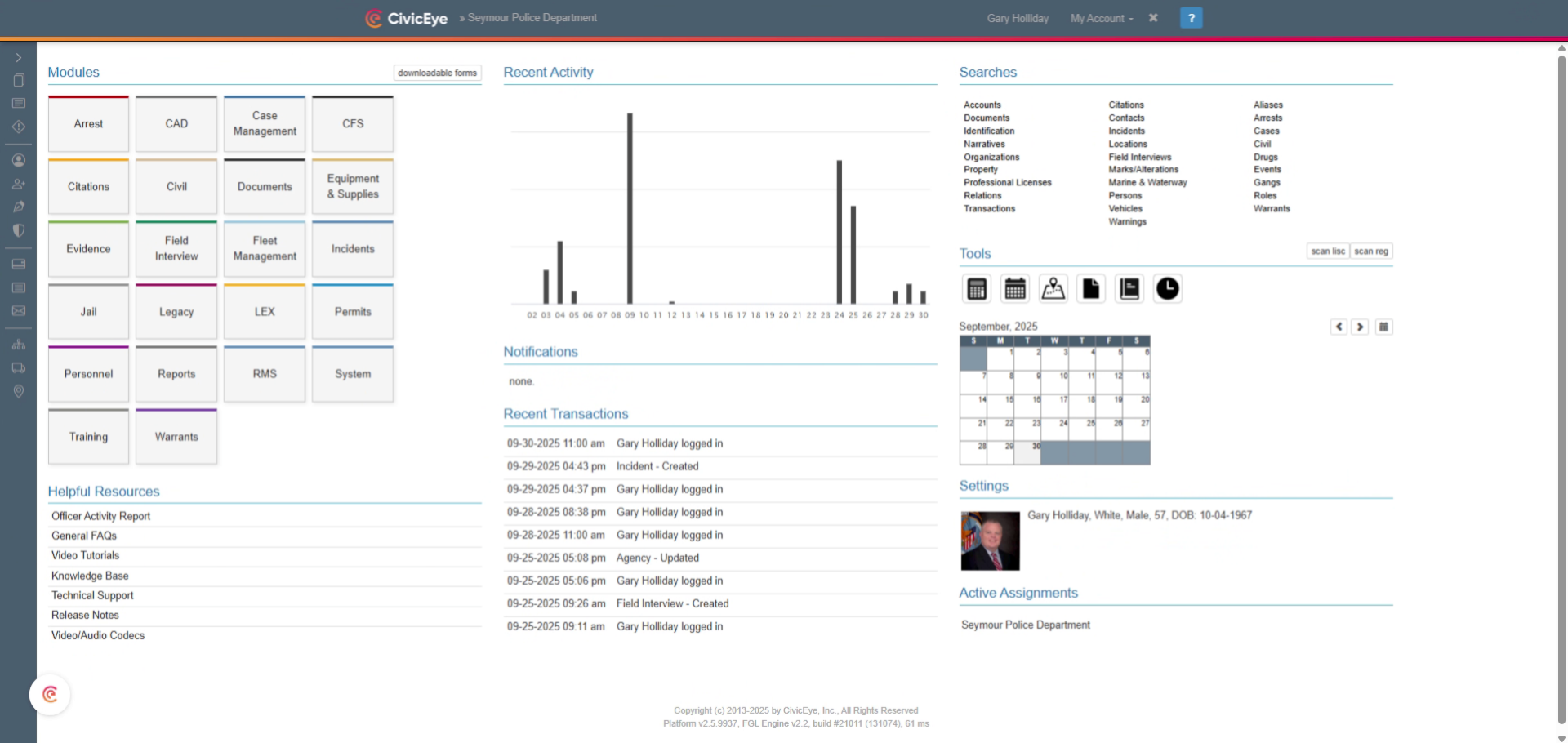
To add property to an incident report, go to the incident module on the main CivicRMS dashboard.
### 3. Select Property
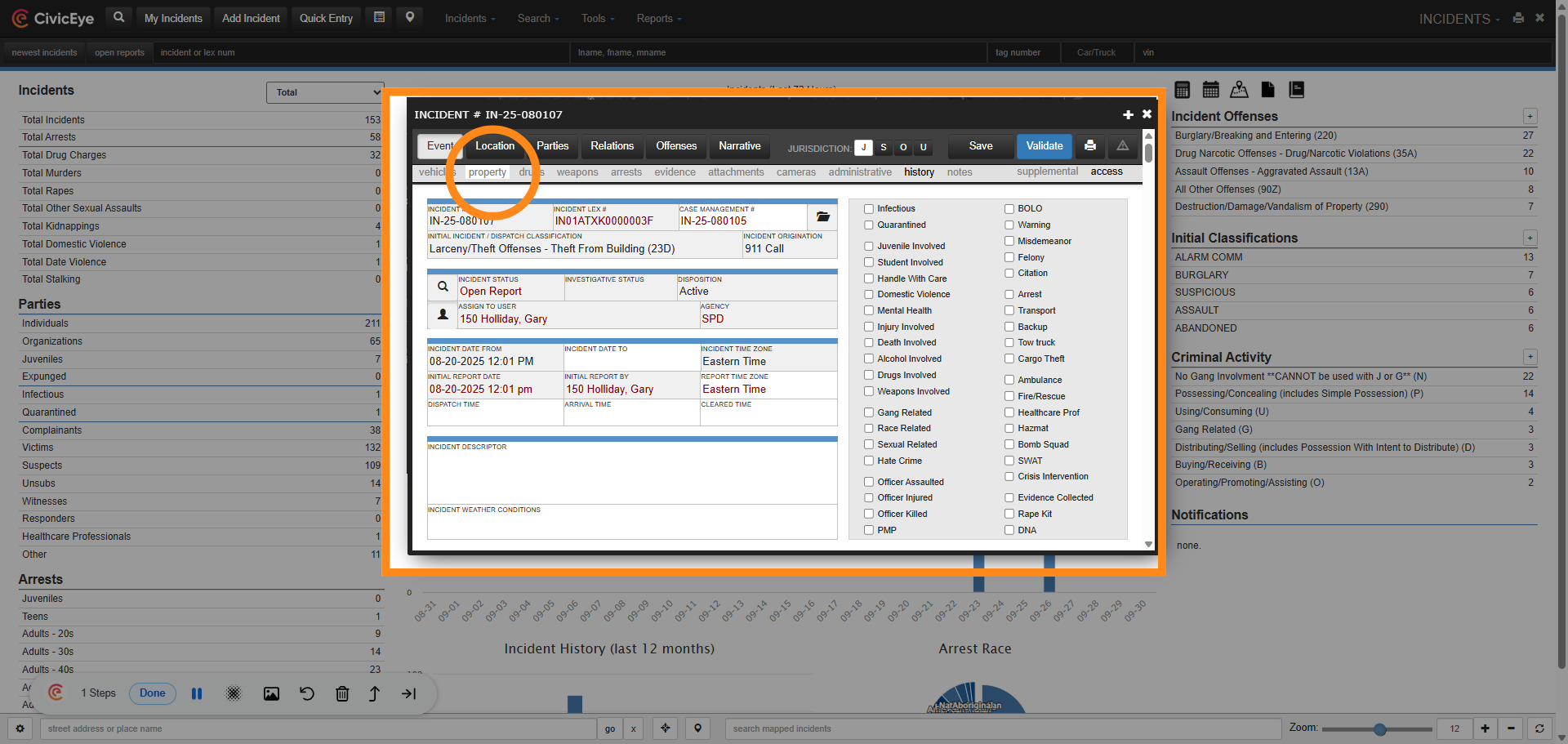
Using a new or existing incident report, select the property tab. This will bring up the general property section of the report.
### 4. Add Property
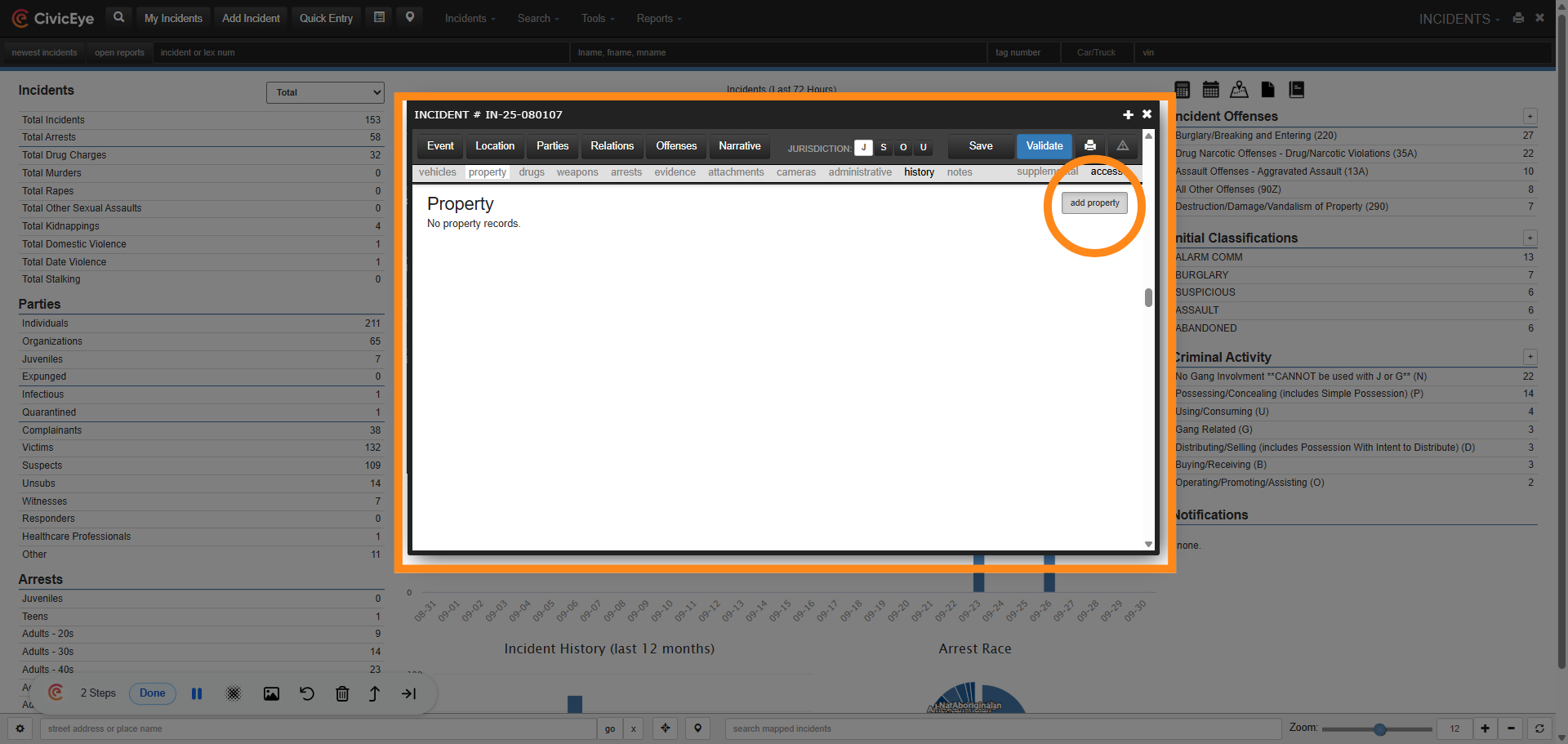
To add a new piece of property to the report, select the add property button.
### 5. Select Property Type
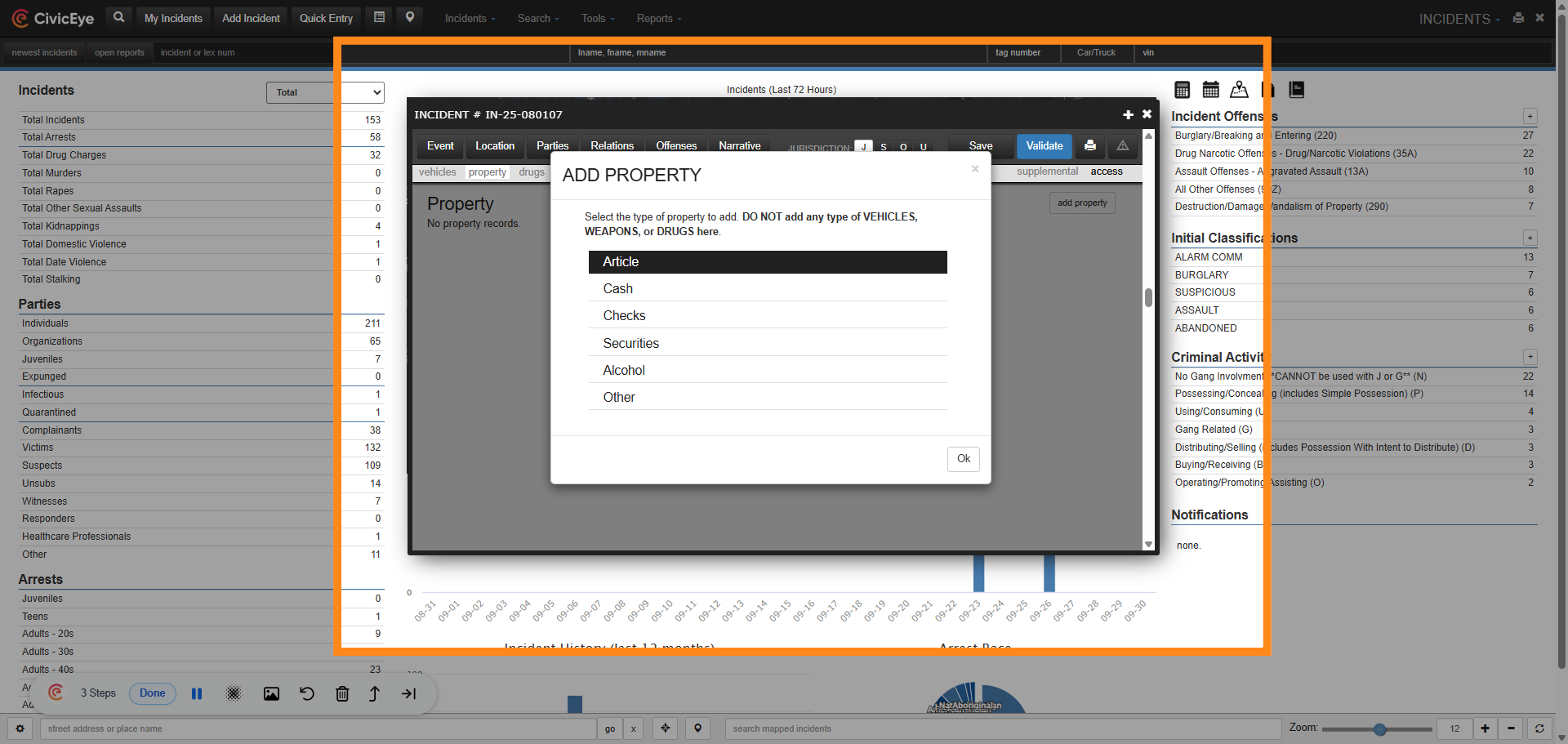
Selecting the add property button opens the add property dropdown. In this area the user will determine which type of property is being added. Remember, this section is for adding articles, cash, checks, securities, alcohol, or other items. Vehicles, weapons used in a crime against person, and vehicles have their own section within the incident report.
### 6. Article / Property Section
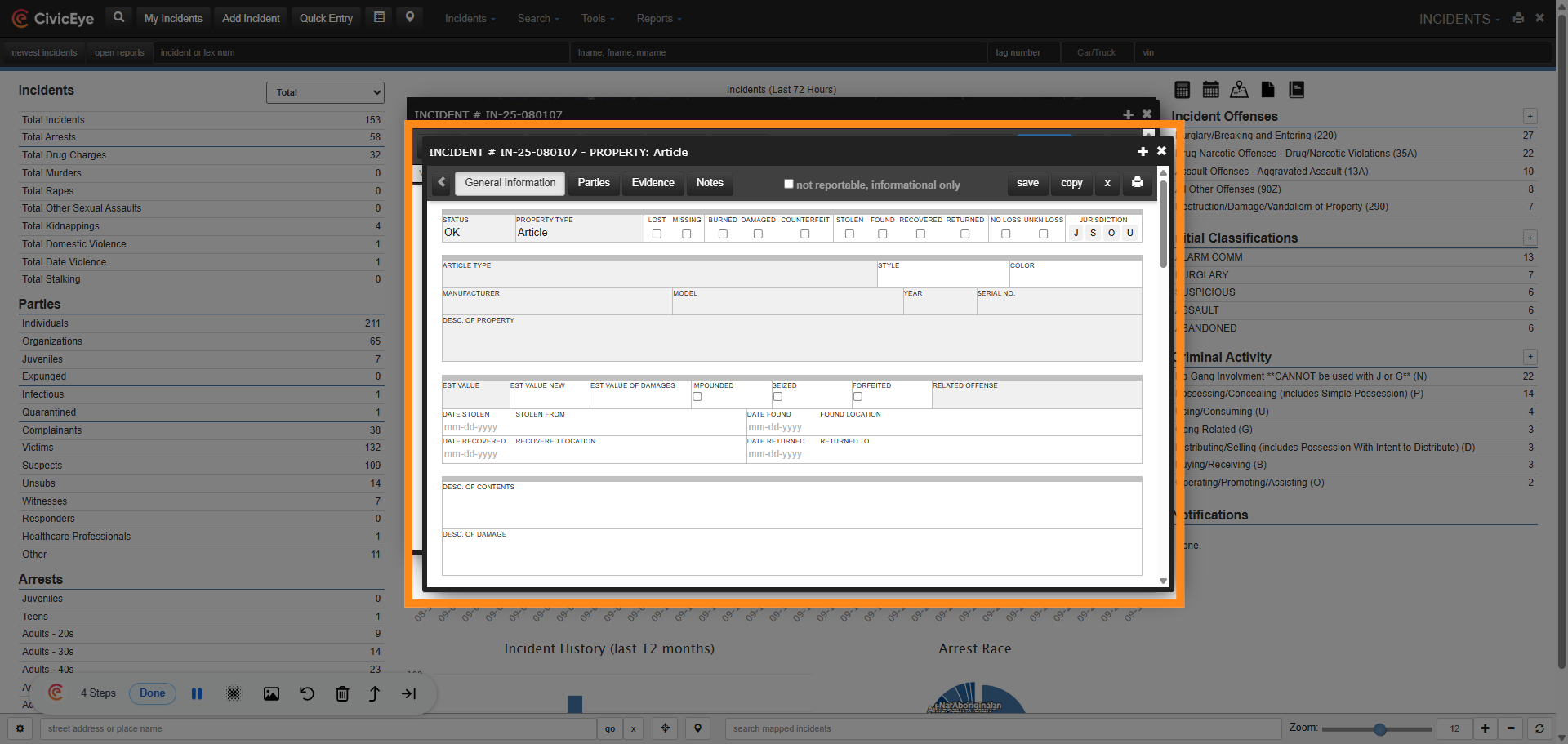
When the user selects the appropriate article type, the report property information page will be displayed. On the page the user will document the property information.
### 7. Required Information
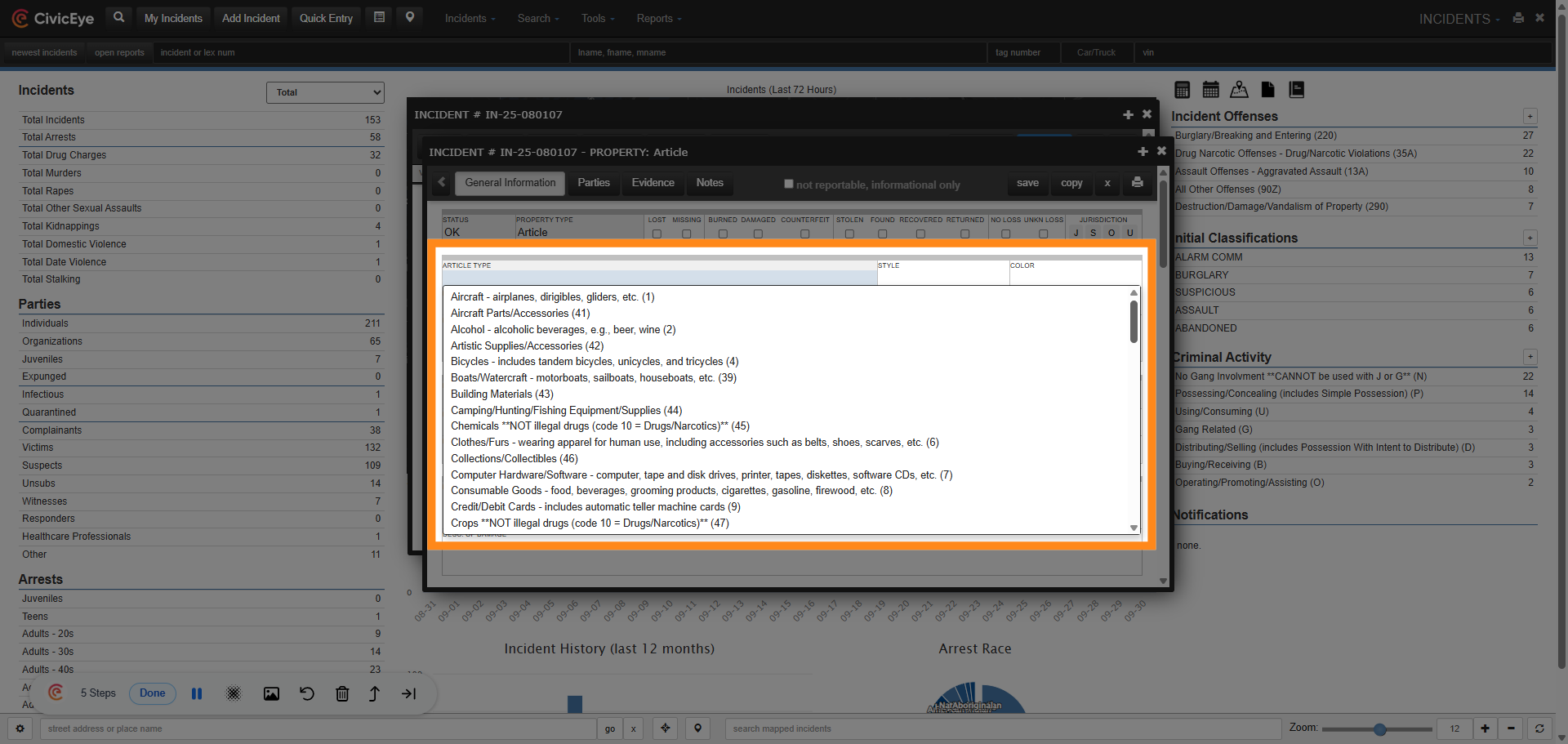
Incident based reporting validation rules require specific information be documented on all property. This includes the article type. Selecting the article type box provides the user a drop down of NIBRS specific article types. Here the user will select the appropriate article type.
### 8. Required Information
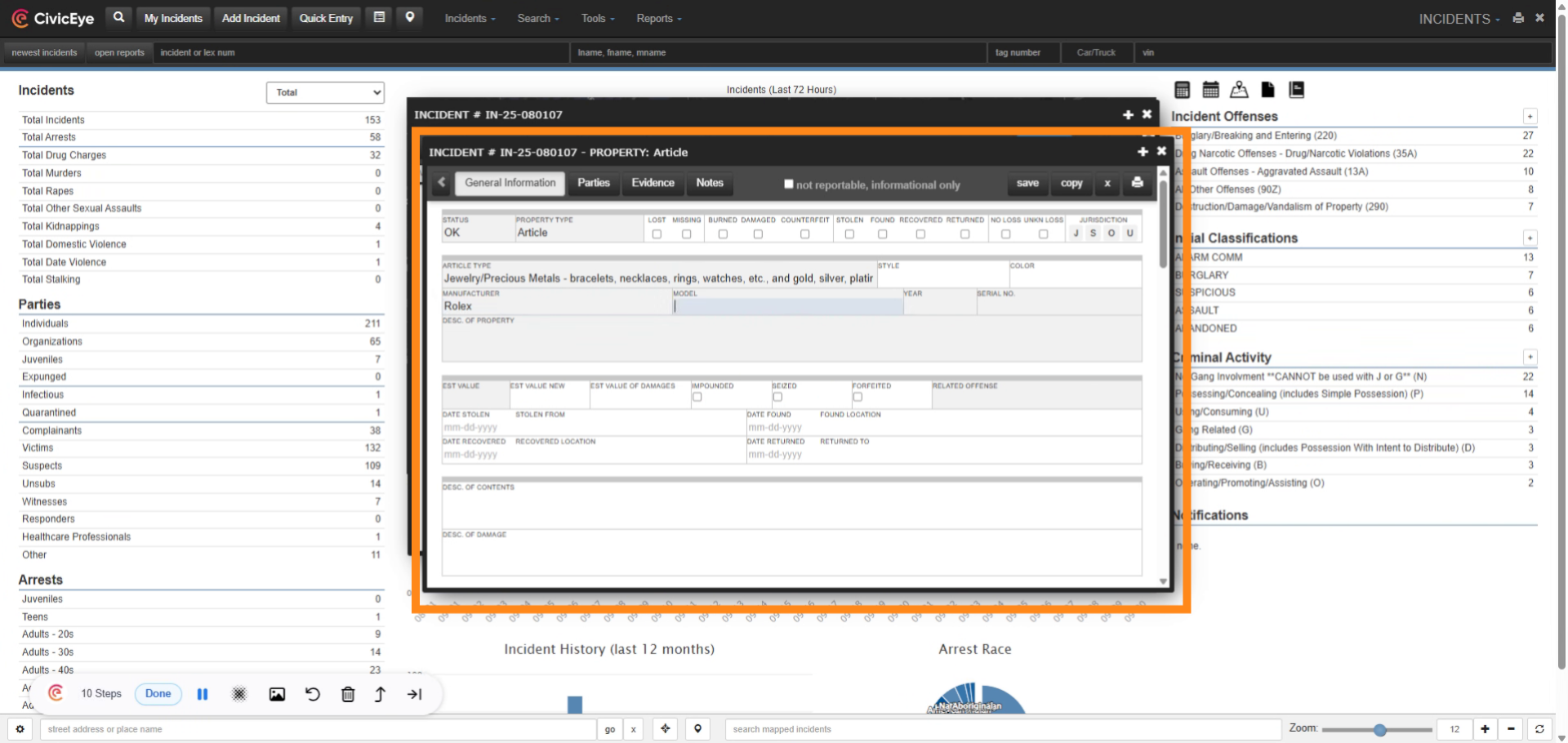
After selecting the appropriate article type, the user can continue to document other required or investigative information, such as article description, model, and serial number.
### 9. Required Information
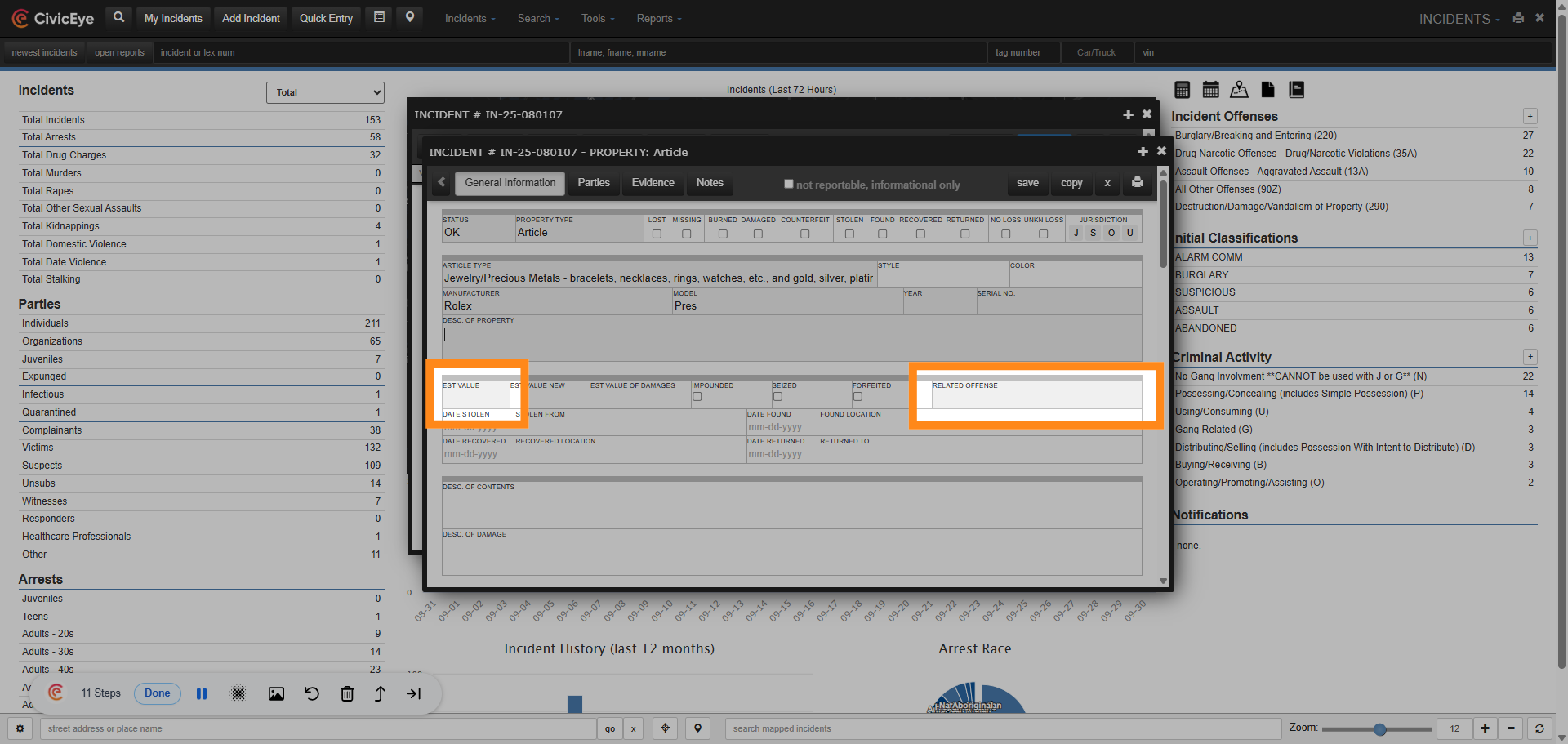
Other required fields include estimated value of the item, and the offense associated to the property.
### 10. Stolen Items
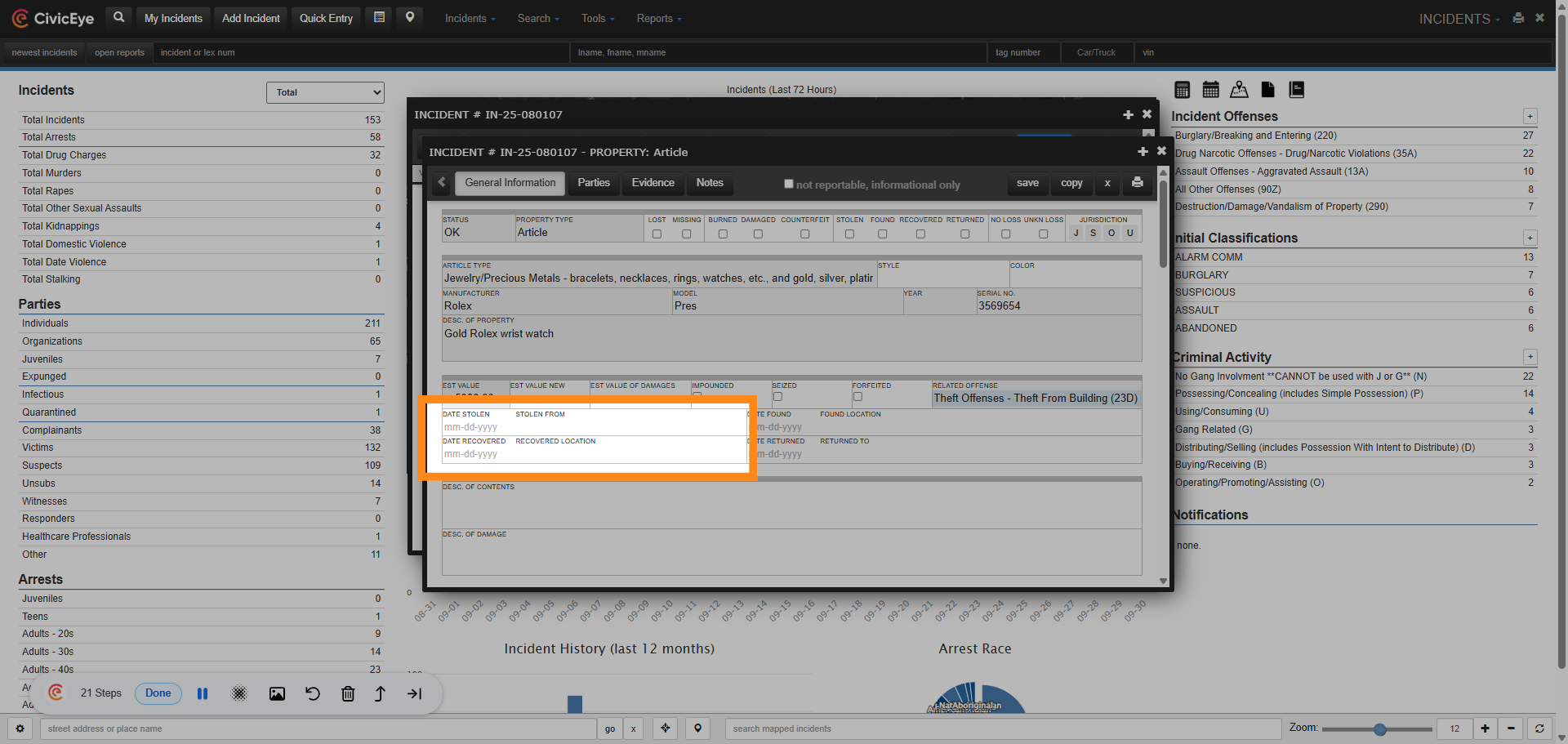
In the event the item listed was stolen, the date and location stolen should be added to the property section.
### 11. Property Loss Type
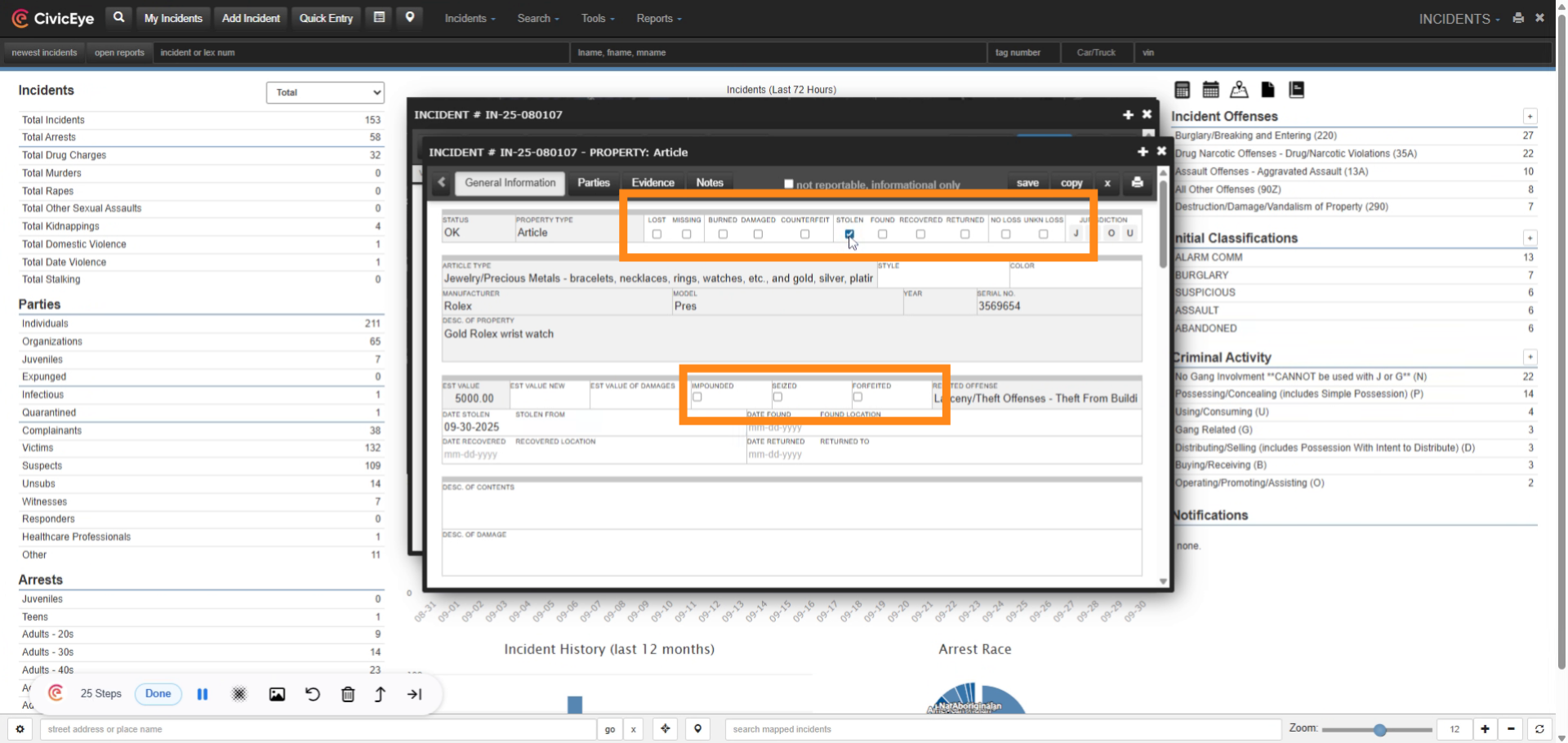
Incident based reporting requires agencies assign a loss type to all property. Property loss types are located on the property page, and include stolen, damaged, burned, lost, and missing. Refer to the NIBRS user manual, property loss data element 14, for FBI requirements and examples of property loss types.
### 12. Property Added to Incident Report
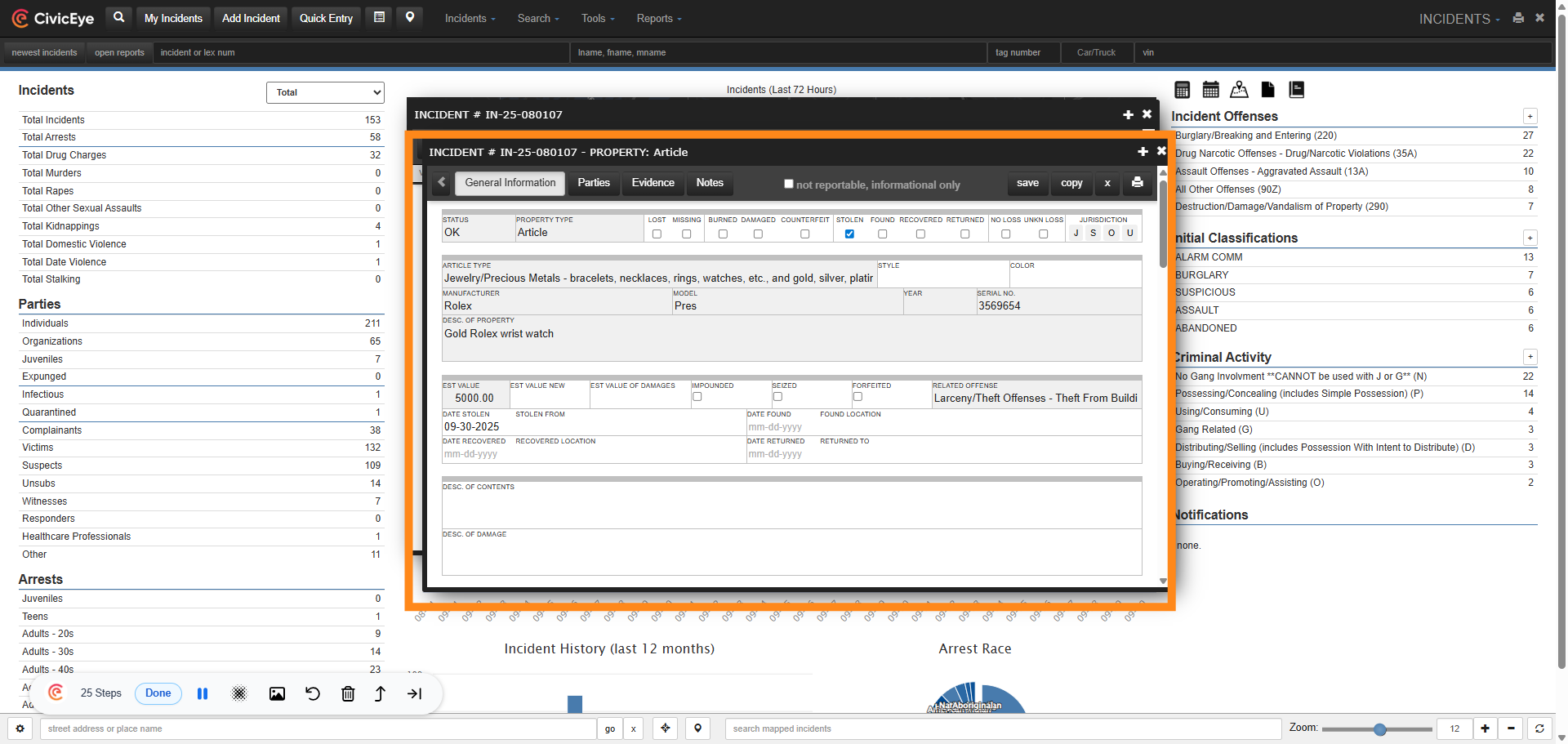
We have now successfully added property to the incident report and included all NIBRS required information, to include article type, description, estimated value, associated offense, and loss type.
For further questions about adding property, or any other CivicRMS issue, please call a client support manager at 877-778-5277, or email us at support@civiceye.com.
[Powered by **guidde**](https://www.guidde.com)
- [How to Request New Training Content](https://knowledgebase.civiceye.com/knowledge-base/how-to-request-new-training-content?hsLang=en)
- [CivicCase](https://knowledgebase.civiceye.com/knowledge-base/civiccase?hsLang=en#main-content)
- [Prosecutor and Admin Portals](https://knowledgebase.civiceye.com/knowledge-base/civiccase?hsLang=en#prosecutor-and-admin-portals)
- [CivicDocs](https://knowledgebase.civiceye.com/knowledge-base/civicdocs?hsLang=en#main-content)
- [Evidence Management](https://knowledgebase.civiceye.com/knowledge-base/civicdocs?hsLang=en#evidence-management)
- [User Access](https://knowledgebase.civiceye.com/knowledge-base/civicdocs?hsLang=en#user-access)
- [Defense Portal](https://knowledgebase.civiceye.com/knowledge-base/civicdocs?hsLang=en#defense-portal)
- [Law Enforcement Portal](https://knowledgebase.civiceye.com/knowledge-base/civicdocs?hsLang=en#law-enforcement-portal)
- [CivicRMS](https://knowledgebase.civiceye.com/knowledge-base/civicrms?hsLang=en#main-content)
- [Master Index](https://knowledgebase.civiceye.com/knowledge-base/civicrms?hsLang=en#master-index)
- [Incident Reports](https://knowledgebase.civiceye.com/knowledge-base/civicrms?hsLang=en#incident-reports)
- [NIBRS](https://knowledgebase.civiceye.com/knowledge-base/civicrms?hsLang=en#nibrs)
- [Property](https://knowledgebase.civiceye.com/knowledge-base/civicrms?hsLang=en#property)
- [Persons](https://knowledgebase.civiceye.com/knowledge-base/civicrms?hsLang=en#persons)
- [Arrest and Warrants](https://knowledgebase.civiceye.com/knowledge-base/civicrms?hsLang=en#arrest-and-warrants)
- [General](https://knowledgebase.civiceye.com/knowledge-base/civicrms?hsLang=en#general)
- [FAQs](https://knowledgebase.civiceye.com/knowledge-base/faqs?hsLang=en#main-content)
- [Support](https://knowledgebase.civiceye.com/knowledge-base/faqs?hsLang=en#support)
- [Training](https://knowledgebase.civiceye.com/knowledge-base/faqs?hsLang=en#training)
- [Support](https://knowledgebase.civiceye.com/knowledge-base/support?hsLang=en#main-content)
- [User Access / Permissions](https://knowledgebase.civiceye.com/knowledge-base/support?hsLang=en#user-access-permissions)
- [Getting started](https://knowledgebase.civiceye.com/knowledge-base/getting-started?hsLang=en#main-content)
- [CivicEye Personnel Module](https://knowledgebase.civiceye.com/knowledge-base/getting-started?hsLang=en#civiceye-personnel-module)
[.png?width=250&height=99&name=CivicEye_Identity_Secondary%20(4).png)](https://knowledgebase.civiceye.com/?hsLang=en)
The Platform for Public Safety
[mailto:help@civiceye.com](mailto:help@civiceye.com)
Copyright © 2025, CivicEye